Every security tool gets a few chances. A developer opens the first ticket, finds a real problem and fixes it. The second ticket is a duplicate of the first. The third is a “critical” in a test fixture. By the fourth, the developer has stopped reading, and the tool has become a source of noise that a security team must now push through by escalation.
In short
- Developer attention is a budget. Every duplicate, false positive and unexplained priority spends it; every useful, actionable finding earns it back.
- Duplicates are the most expensive noise. The same issue from three scanners looks like three problems, and teaches developers that the list is inflated.
- Explain the priority and give the fix. A finding that says why it matters and what to change gets fixed. A CVE number with a severity does not.
- Gate the pipeline narrowly. Block only new, high-priority findings. A gate that fails builds for old or low-priority issues gets switched off.
How the budget gets spent
Developers rarely reject security outright. They reject tools that waste their time. The patterns are consistent across organisations, and each one is avoidable.
| What the developer sees | What they conclude | Cost to the programme |
|---|---|---|
| The same vulnerable package reported by SCA, the container scan and the SBOM tool | “The numbers are inflated” | Every future count is discounted |
| A critical in a test file or a dev-only dependency | “Security does not understand our code” | Real criticals are treated the same way |
| A priority with no explanation | “It is a black box; argue with the tool” | Every finding becomes a negotiation |
| A CVE number and a link to the advisory, no fix | “Not my job to research this” | Findings age out past SLA |
| A CI build failing for an issue that was already there last month | “The gate is broken” | The gate is bypassed or disabled |
| A ticket for a finding someone else must fix (a base image) | “Wrong team” | Tickets bounce; nobody owns it |
Our demo estate: 382 raw results. Correlation removed 95 duplicates; context moved 156 below the actionable line; 131 remained. Nothing was deleted.
Earning it back: four rules
1. One issue, one finding
Correlation is the cheapest trust you can buy. If the same package version with the same CVE in the same repository is reported by three tools, the developer should see one finding with three sources listed. If a rescan or another branch reports it again, it is the same finding, not a new one. When the fix ships, the next scan closes it on its own.
2. Show why it matters
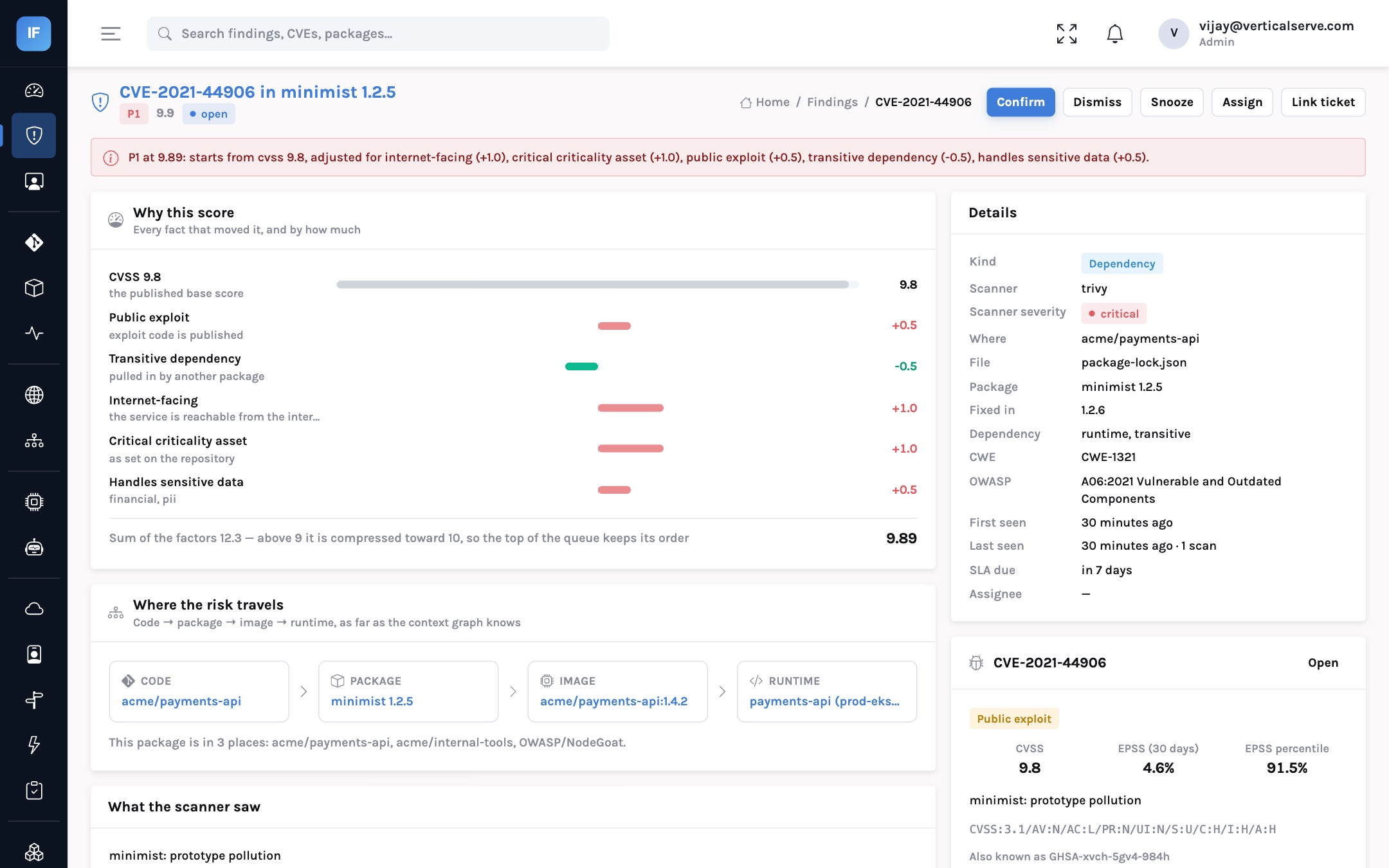
A priority is a claim, and developers are trained to check claims. Show the factors: known exploitation, internet exposure, sensitive data, test code, dev-only scope. A developer who disagrees can then point at one factor (“this service is not internet-facing”) and the fix is a context change, not a fight.
3. Give the fix, not the advisory
For a dependency, that means the fixed version. For code, the change to make. For infrastructure, the setting. InsightFortify adds an AI explanation and suggested fix through the deployment’s own model provider, and by default sends the finding and advisory, never the code itself, unless an administrator chooses otherwise.
4. Gate narrowly
A CI gate is the most powerful and most dangerous tool in the kit. Powerful because it stops new risk at the cheapest moment. Dangerous because a gate that blocks for the wrong reasons gets switched off, and once off it rarely comes back on.
Hundreds of pre-existing criticals, many in test code. Builds fail for reasons the author did not introduce. Within a month there is a bypass flag in every pipeline.
The author sees only what their change introduced, ranked by real risk. Failures are rare, specific and fixable in the same pull request.
What a narrow gate looks like
The gate compares against what is already known, so a developer is never blocked for an issue they did not introduce.
In InsightFortify the gate threshold is an organisation setting: by default it fails on new P1 findings, and it can be set to P2, P3, P4 or off. The pipeline sends its scanner output, the API correlates it, and the response names any blocking findings with their title, priority and file. The developer gets a specific reason, not a wall of text.
Gate threshold off. Pipelines send results; nobody is blocked. Watch what would have failed.
For each one: was it real, new and high priority? Fix the context or rules behind any that were not.
A team that volunteered. Agree an escalation route for a false block.
Publish the gate policy and the bypass process, with a reason required.
Tighten when the P1 false-block rate is near zero and teams are meeting SLA.
Measuring the budget
Trust is hard to measure directly, but its symptoms are not.
| Signal | Healthy | Warning |
|---|---|---|
| Dismissal rate on assigned findings | Low and explained | High in one team: either bad context or disengagement |
| Time from assignment to first action | Days | Weeks; findings are being ignored |
| Gate bypasses per month | Rare, each with a reason | Routine; the gate has lost credibility |
| Share of findings fixed versus snoozed | Mostly fixed | Mostly snoozed, renewed each quarter |
| Questions to the security team | “Is this factor right?” | “Why is this even here?” |
data
Industry surveys of developers consistently report that false positives and noise are among the top frustrations with application security tools, and that unexplained findings are a leading reason security issues are deprioritised. The exact percentages vary by survey; the direction does not.
Sources: vendor and analyst developer surveys, e.g. GitLab DevSecOps surveys and similar annual reports. Treat individual percentages with care.
For each audience
For the CISO
Developer trust is a programme asset with a real cost to rebuild. Protect it by refusing to send noise.
Ask for the dismissal and bypass rates. They tell you more about the programme’s health than the vulnerability count.
For the AppSec lead
Correlate before you route. Explain before you assign. Gate on new P1 findings first, and tighten only on evidence.
Treat every complaint about a specific factor as a free bug report on your context data.
For the board
A security programme engineers trust gets more fixed with the same headcount.
Noise is not a minor irritation: it is the main reason vulnerabilities stay open past their deadline.
The fastest way to get vulnerabilities fixed is to stop sending developers the ones that do not matter.
One issue, one finding. Show why. Give the fix. Gate only what is new and serious.