Most cloud breaches do not need a zero-day. They need a credential, and then the permissions attached to it. An attacker who gets code running in a container inherits whatever role that container runs as, and from that moment the question is no longer “how did they get in?” but “what could that role do?”. In most AWS accounts, the honest answer for a surprising number of roles is “more or less anything”.
This post follows one illustrative role, payments-api-task in the demo account
acme-prod (demo), from discovery to a least-privilege policy, and shows how to find the
others like it.
In short
- Effective permissions are the union of many policies. Managed, inline and group policies, each reasonable alone, add up to roles that are administrators in all but name.
- Look for escalation, not just administrator. A role that can attach a policy to itself or pass a privileged role to new compute can become an administrator in one call.
- Measure blast radius against what matters. Which sensitive resources can this identity read or change? That is the risk statement the business understands.
- Shrink from evidence. Access-advisor data shows which services a role actually used; a policy limited to those is a safe starting point for least privilege.
Why over-privilege is the default
No one sets out to create an administrator role for a payments API. It happens in steps. A
developer needs the service to read one bucket and attaches AmazonS3FullAccess because
the deadline is tomorrow. A later feature needs to send messages and someone adds an inline policy
with sqs:*. A shared group policy grants iam:PassRole for a deployment
script. Each change was reviewed, or at least approved, in isolation. Nobody reviewed the sum.
data
Cloud security research from several major providers has repeatedly found that the large majority of granted cloud permissions are never used, and that valid credentials, rather than software exploits, are among the most common ways attackers operate in cloud environments.
Sources: Microsoft State of Cloud Permissions Risks report (2023); Verizon Data Breach Investigations Report (credential abuse); public cloud incident analyses. Exact percentages vary by study.
A pull request adds one statement and looks reasonable. The role’s effective permissions, across every attached policy, are never computed or reviewed.
Every managed, inline and group policy is folded into one list of allowed actions and resources for each user and role, then checked for administrator access, escalation paths, open trust and unused grants.
What the analysis looks for
InsightFortify’s AWS identity analysis works from one export,
aws iam get-account-authorization-details, which lists every user, group and role and
every version of every policy. It is collected by the read-only scan role or uploaded. For each
principal it folds the default version of every attached managed policy, every inline policy and,
for users, every group’s policies, then flags:
| Check | What it means | Why it matters |
|---|---|---|
| Full administrator | Action: * on Resource: *, or AdministratorAccess | A compromise of this identity is a compromise of the account |
| Privilege escalation | Holds a known route to more power, such as iam:CreatePolicyVersion, iam:Attach*Policy, iam:PassRole with a compute service, rewriting a trust policy | Not an administrator today, one API call from being one |
| Open trust | A role anyone can assume, or another account can assume without an ExternalId condition | The confused-deputy problem: someone else’s compromise becomes yours |
| Unused | Never used, or not in 90 days, but still holds permissions | Standing access with no business need |
| Broad wildcards | service:* on every resource | Over-grant that is usually accidental and easy to narrow |
The escalation catalogue follows published research on AWS privilege escalation, notably Rhino Security Labs’ work, and each path found is named in plain language: “Pass a privileged role to a new Lambda and invoke it”, rather than a list of action strings.
A limitation stated up front
The analysis reports what policies grant. It does not subtract explicit denies, permission boundaries or service control policies. For a principal that an SCP or boundary already limits, it can over-report. That is the safer direction to be wrong in, but you should know it. Identity analysis currently covers AWS; Azure and Google Cloud posture checks run through Prowler, without this entitlement analysis.
Blast radius: from permissions to business impact
A list of 300 allowed actions does not tell an executive anything. “This role can read the bucket of card-payment exports” does. Blast radius is computed by matching an identity’s effective grants against the resources the posture scan has inventoried, with special attention to the ones you have marked as holding sensitive data. Marking a resource sensitive is a one-click decision on the cloud account page, and every finding and attack path re-evaluates when you do.
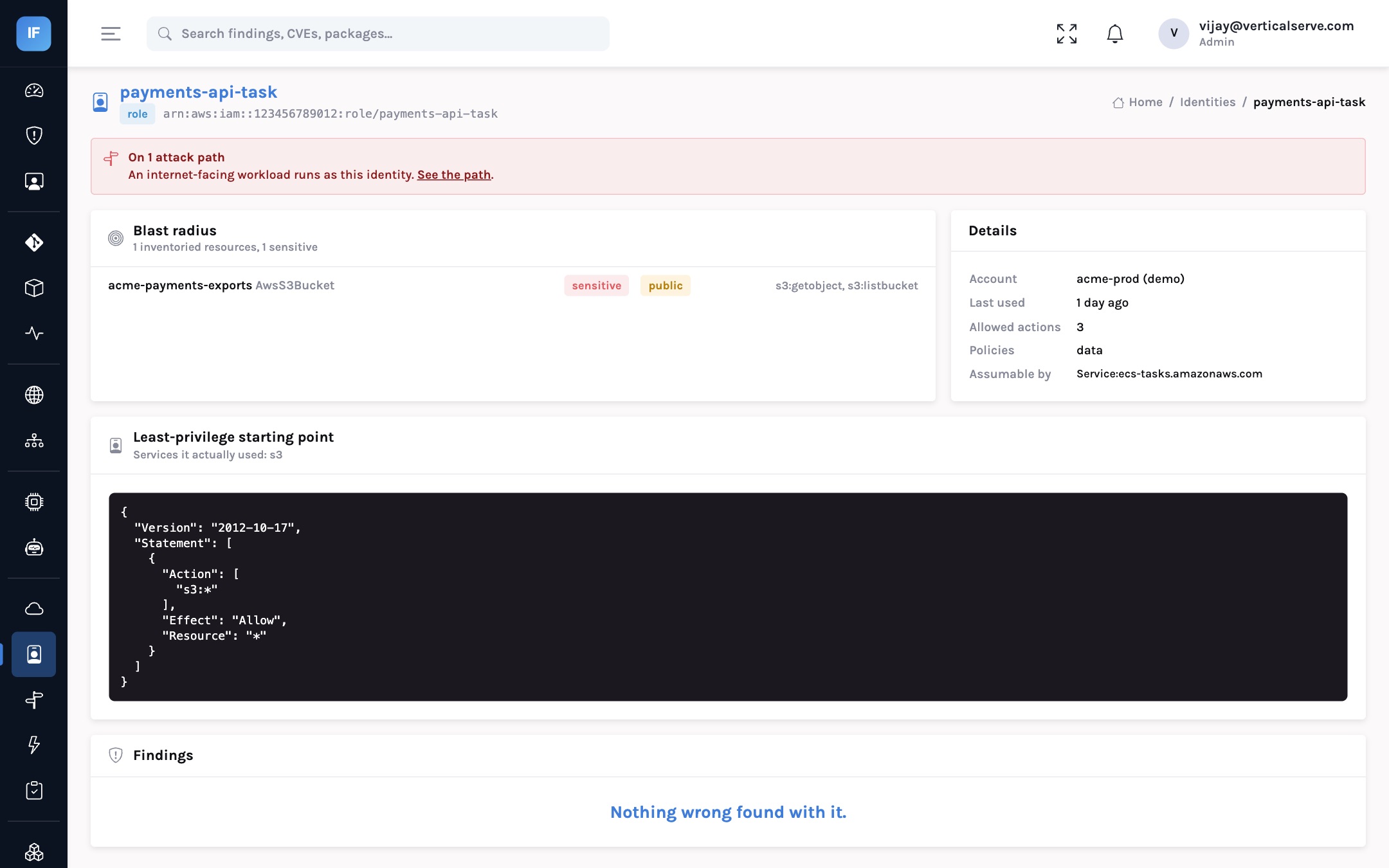
payments-api-task is on an attack path, its blast radius reaches the sensitive acme-payments-exports bucket, and access-advisor data shows it only ever used S3.In the demo account, payments-api-task is assumable by the ECS tasks service and
holds s3:* through a policy simply called “data”. Its blast radius includes
acme-payments-exports, a bucket marked sensitive and also public. Because the payments
service faces the internet and its image has exploitable vulnerabilities, the role sits on an
attack path, and the page says so at the top.
users, groups, roles, policies"] --> B["Fold effective
permissions per identity"] B --> C{"Admin, escalation,
open trust, unused?"} C -->|"yes"| D["Identity finding"] B --> E["Match grants to
inventoried resources"] S["Resources marked sensitive"] --> E E --> F["Blast radius"] F --> G["Attack paths
exposed workload runs as it"] H["Access advisor
services used"] --> I["Least-privilege
starting policy"]
Least privilege from what was actually used
The reason least privilege projects stall is fear: nobody wants to remove a permission and break
production at 2am. The evidence that removes the fear exists. AWS access-advisor data records which
services each role has used. When that data is included in the export, each identity gets a
recommended policy limited to the services it used. For payments-api-task, that is S3
only.
It is a starting point, not a finished policy. Service-level scoping is coarser than
action-level or resource-level scoping, and the next step, limiting s3:* to
s3:GetObject on the one bucket the service reads, needs someone who knows the
application. But it turns a frightening blank page into a reviewable diff.
Illustrative. The fix happens in your infrastructure-as-code; InsightFortify proposes and verifies, it does not change IAM.
Scan the account through the read-only role, or upload the IAM export with access-advisor data.
Administrators and roles that can escalate first; among those, the ones reaching sensitive resources or sitting on attack paths.
Start from the recommended policy. Name the actions and the specific resources the service needs.
Update the role in Terraform or CloudFormation; the IaC scan checks the change at the pull request.
Deploy in a lower environment first; watch for access-denied errors for a release cycle.
Escalation and admin findings close; the attack path closes because a link is gone.
Roles unused for 90 days: disable, wait, delete.
What changes for each audience
For the CISO
Identity risk is expressed in terms that survive a board conversation: which roles can reach which sensitive data, and how many can make themselves administrators.
Least privilege becomes a measurable programme with a burn-down, not a principle in a policy document.
For the AppSec lead
Every finding names the escalation path in plain language and comes with a proposed policy, so the conversation with a service team starts from evidence.
Attack paths show which identity changes remove the most risk for the least effort.
For the board
“How many cloud identities could take over an account if compromised?” is a number, it is tracked, and it should fall every quarter.
It is directly relevant to the controls regulators and auditors increasingly ask about.
Outcome metrics
| Metric | Definition | Target direction |
|---|---|---|
| Effective administrators | Identities with full admin, by account | Small, named, justified |
| Identities that can escalate | Non-admins holding an escalation path | Down to zero outside break-glass |
| Identities reaching sensitive data | Blast radius includes a resource marked sensitive | Only those whose job needs it |
| Unused identities | No use in 90 days, permissions still attached | Down, continuously |
| Attack paths through an identity | Open path findings whose identity link is this role | Zero |
Attackers do not need to break in if they can log in. They then need only what the identity already allows.
Compute what every identity can really do, measure it against the data that matters, and narrow it from evidence of what it actually used.