Risk-based application security programmes rarely fail on technology. They fail in the first quarter, when a new tool produces a large number on day one, the number goes in front of leadership before anyone understands it, and engineering decides the programme is noise. The first ninety days are about getting the order right: see everything, make it accurate, then make it binding.
In short
- Days 1–30: see. Connect repositories, pipelines and one cloud account, report-only. Measure the baseline. Fix asset ownership and business context.
- Days 31–60: trust. Tune context with teams, agree SLAs and the exception process, run the CI gate silently, name security champions.
- Days 61–90: commit. Turn on the P1 gate, start SLA reporting, extend coverage, and present the first board metrics with a trend.
- Do not publish a number before it is accurate. The first raw count will be large and partly wrong. Present it as a baseline, not a verdict.
The plan on one page
Illustrative calendar. The sequence matters more than the dates: nothing becomes binding until the data behind it is accurate.
See everything, change nothing
- Connect source control and the highest-value repositories first
- Send CI scanner output through the API, gate off
- Connect one cloud account with read-only access
- Record the baseline: raw, unique and actionable counts; current time to remediate
- Assign an owning team to every repository and account
Make it accurate and agreed
- Review the top 20 findings with each pilot team; fix context, not just findings
- Agree SLAs and the exception policy with engineering leadership
- Watch what the CI gate would have blocked; tune until false blocks are rare
- Name a champion in each team
- Mark sensitive data stores in the cloud inventory so attack paths are real
Make it binding and report it
- Turn on the P1 gate for a pilot team, then all teams
- Start SLA tracking and overdue reporting
- Extend scanning to the rest of the estate
- Present the five board metrics, with the baseline as the comparison
- Plan the next quarter: more cloud accounts, DAST targets, AI inventory
Days 1–30: see
The goal of the first month is coverage and a baseline, with no obligations on anyone. Start with the repositories that matter most: the internet-facing services and anything that handles payment, personal or health data. Ten well-chosen repositories teach you more than five hundred chosen at random.
API, scan workers, PostgreSQL and Redis. Sign-in through your identity provider.
GitHub, GitLab, Bitbucket or Azure DevOps. The token is stored sealed and read only at scan time.
Set internet-facing, data classes and criticality for each with the owning team.
Raw versus unique versus actionable. Spot-check the top twenty for accuracy.
Post scanner output to the CI endpoint with the gate threshold set to off.
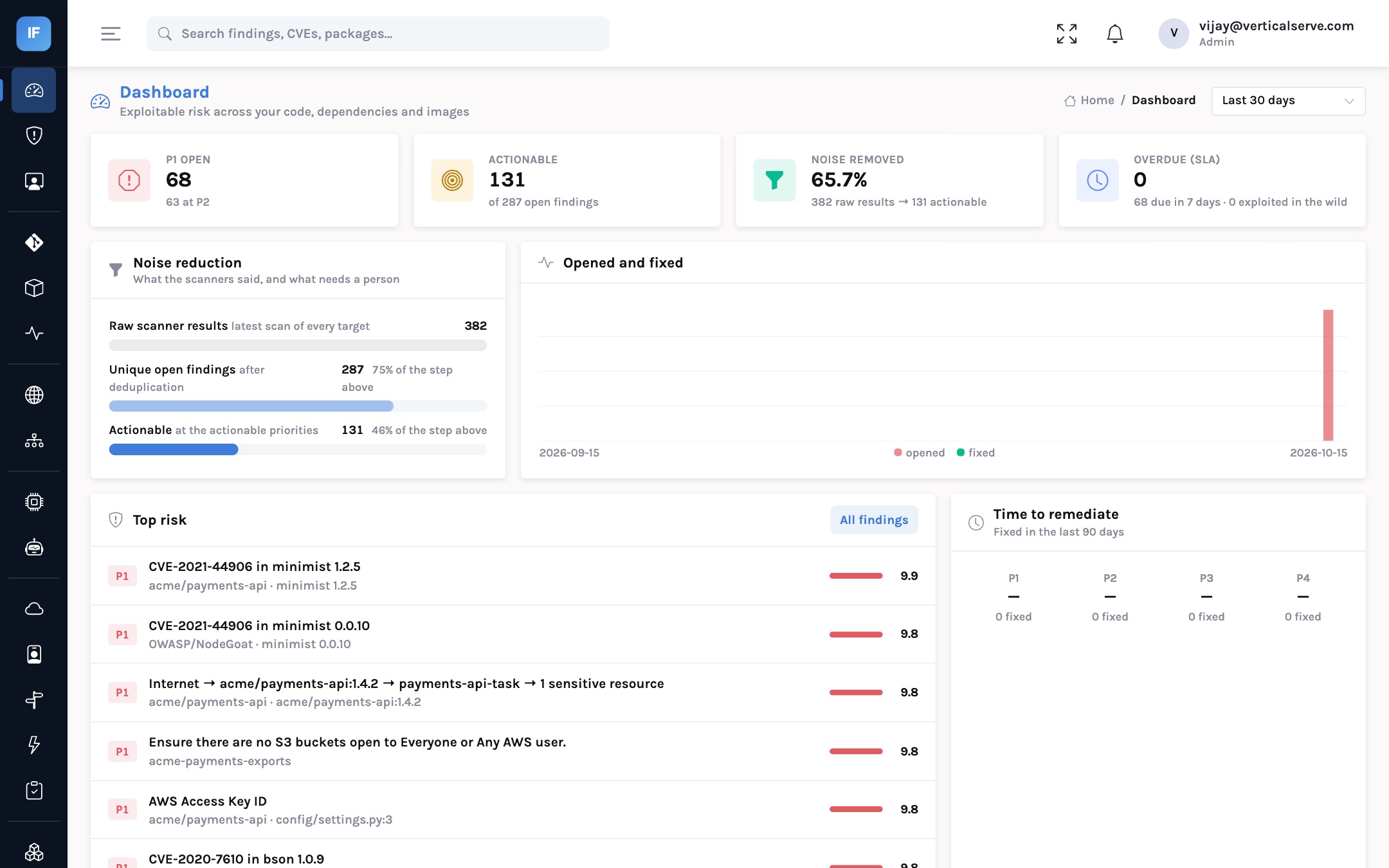
By the end of the month you should be able to state the baseline in one sentence: “across N repositories and one account, scanners report X raw results, which are Y unique findings, of which Z are actionable; our current median time to fix a critical is D days.” On our own demo estate the first three numbers were 382, 287 and 131.
The day-one number will be large. That is fine.
The first full scan of a real estate often reports thousands of results. Present it as the starting point the programme will reduce, never as a measure of how insecure the organisation is. Most of it is duplicates and low-risk findings the next two months will sort out.
Days 31–60: trust
The second month is about accuracy and agreement. The single most valuable activity is sitting with each pilot team and reviewing their top twenty findings. Every “this is wrong” is almost always a context problem: a service marked internet-facing that is not, a test directory that is not recognised, a compensating control nobody recorded. Fix the context and every finding on the asset re-scores.
One review per pilot team. Context fixes are worth more than individual dismissals because they apply to every future finding.
In parallel, run the CI gate in report-only mode. Every pipeline sends results; nobody is blocked. Each week, look at what would have been blocked. If a real, new, high-priority finding would have been caught, the gate is working. If a developer would have been blocked for something they did not introduce or that was not serious, fix the cause before the gate goes live.
This is also the month to agree the policy that makes the numbers binding: the SLA per priority (InsightFortify’s defaults are 7, 30, 90 and 180 days for P1 to P4), what counts as actionable (P1 and P2 by default), and how exceptions work. Get it signed by engineering leadership, not just security.
Days 61–90: commit
Only now does the programme become binding. Turn on the CI gate at P1 for a team that volunteered, then for everyone. Start reporting SLA adherence and overdue findings. Extend scanning to the rest of the estate, now that the context model and the ownership map can absorb it.
The baseline is inaccurate, owners are unclear and the gate blocks for old issues. Engineering escalates, the gate is disabled, and the programme starts its second quarter with a credibility problem.
Context is accurate, owners are known, the gate has been proven silently. When it turns on, failures are rare and specific, and SLA reporting measures something teams agreed to.
What to report, and when
| Milestone | Audience | What to show |
|---|---|---|
| Day 30 | CISO and engineering leadership | Coverage achieved; the baseline funnel; current time to remediate; ownership gaps |
| Day 60 | CISO and engineering leadership | Noise reduction after context tuning; agreed SLA and gate policy; champion list; would-be gate failures |
| Day 90 | Executive team or board | The five board metrics: exploited-and-reachable exposure, SLA adherence, time to remediate, opened versus fixed, coverage, each against the baseline |
data
CISA requires US federal agencies to remediate vulnerabilities in its Known Exploited Vulnerabilities catalog within set deadlines, commonly two weeks for newly added entries. Many private-sector programmes now use KEV as their first remediation tier for the same reason: it is a short, evidence-based list.
Source: CISA Binding Operational Directive 22-01 and the Known Exploited Vulnerabilities catalog.
Common ways the first quarter goes wrong
- Connecting everything on day one. Scale amplifies whatever is wrong with the context model. Start narrow and representative.
- Treating dismissals as the tuning tool. Dismissing findings one by one hides the cause. Fix the repository context so the next hundred findings are right too.
- Skipping the ownership map. SLA reporting without owners produces a list of overdue findings nobody is responsible for.
- Leaving cloud context half-done. Attack paths end at data marked sensitive. If nothing is marked, there are no paths to see.
- Presenting the raw count to the board. It will go down for reasons unrelated to risk and up after every acquisition. Present the five metrics instead.
For the CISO
Sequence matters more than speed: see, then trust, then commit.
Your day-90 board presentation is the first point of a trend. Make sure the baseline behind it is defensible.
For the AppSec lead
Spend the second month with teams, not dashboards. Context fixes compound.
Prove the gate silently before it blocks anyone.
For the board
Expect a large first number and a falling actionable count. Ask for the trend at day 90, not the total at day 1.
Ask which teams have agreed the SLA. Agreement is the leading indicator.
The first ninety days decide whether engineering sees the programme as signal or noise.
See everything first. Make it accurate with the teams. Only then make it binding.