An attack path is only as good as its last hop. “An internet-facing service can reach a storage bucket” is interesting; “an internet-facing service can reach the bucket that holds 40,000 card numbers” is an incident waiting to happen. Getting from the first sentence to the second needs two things most organizations only have for one cloud, if at all: what each identity can really do, and what each data store really holds.
In short
- Identity analysis now covers AWS, Azure and Google Cloud, folding every role assignment and policy into the effective permissions of each user, role, service principal and service account.
- It finds the escalation routes, not just the admins: identities that can assign themselves more, act as other identities, mint tokens or rewrite their own permissions.
- Data-store discovery and opt-in sampling decide where paths end. Bounded sampling of object stores, with checksum-validated detectors, marks stores sensitive.
- Counts, never values. InsightFortify records how many card numbers or national IDs it saw, never the matches themselves.
- Paths are computed per cloud and never cross clouds: an Azure identity is never assumed to reach a Google bucket.
The situation
In this illustrative case, a company runs its customer portal on Azure App Service, its analytics on Google Cloud and its payments platform on AWS. Each cloud team reviews its own permissions once a year. Nobody owns the question “which internet-facing workload, in any cloud, can reach regulated data?” The data protection officer has a spreadsheet of where personal data is supposed to live, last updated before two migrations.
data
Industry breach reports consistently list stolen or misused credentials among the most common ways attackers get in, and cloud-provider research has repeatedly found that most permissions granted to cloud identities are never used.
Sources: Verizon Data Breach Investigations Report (2024 and 2025 editions); Microsoft, State of Cloud Permissions Risks (2023). Figures vary by edition and method.
Permissions reviewed per cloud, per team, once a year. Sensitive data located by asking people. Attack paths drawn on a whiteboard after an incident.
Effective permissions and escalation routes for every identity in all three clouds, data stores classified by sampling, and paths recomputed after every scan.
Identities: what they can really do
| Cloud | Where permissions come from | What counts as administrator | Escalation routes found |
|---|---|---|---|
| AWS | Attached and inline policies, groups, trust policies | Full control of the account | PassRole with compute, policy edits, credential creation and similar |
| Azure | Role assignments and role definitions (built-in and custom, notActions carved out), groups folded into members | Owner, or Contributor plus User Access Administrator, at subscription scope or above | Assigning roles, editing custom roles, VM run-command with a managed identity, attaching identities, Key Vault access policies, App Service code, Automation, deployment scripts, risky Graph app permissions |
| Google Cloud | IAM policies at project, folder, organization and resource level | Owner | Token minting, key creation, signing, setIamPolicy, custom-role edits, actAs with compute, Functions or Cloud Run, Cloud Build, Deployment Manager, instance metadata |
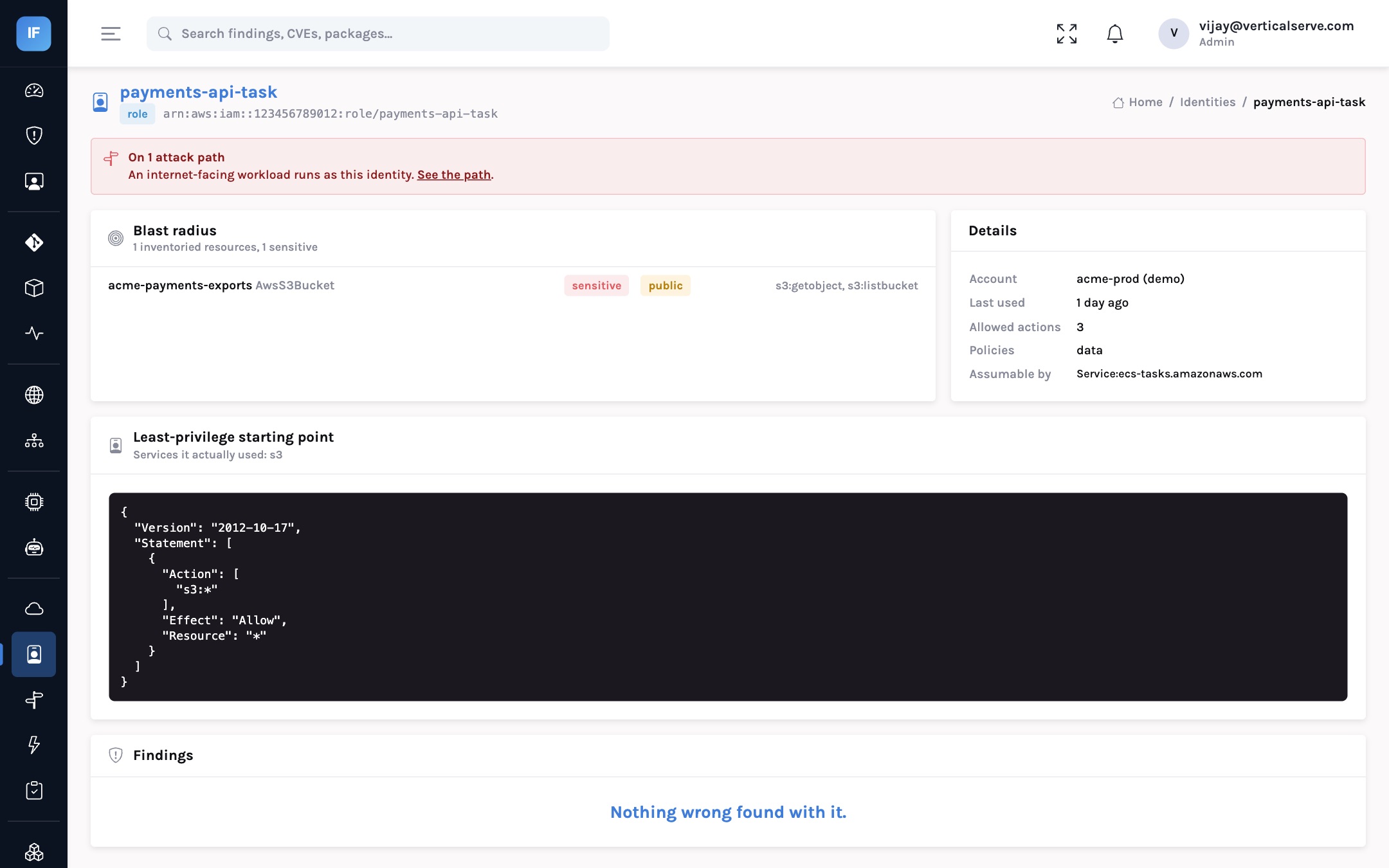
Each identity also gets a blast radius — the inventoried resources its permissions reach — and, where usage data is available (AWS access advisor, the Azure Activity Log, the GCP IAM recommender), a least-privilege starting point built from what it actually did. A principal with several escalation routes gets one finding listing them all, rather than one alert per route.
Data: what the stores actually hold
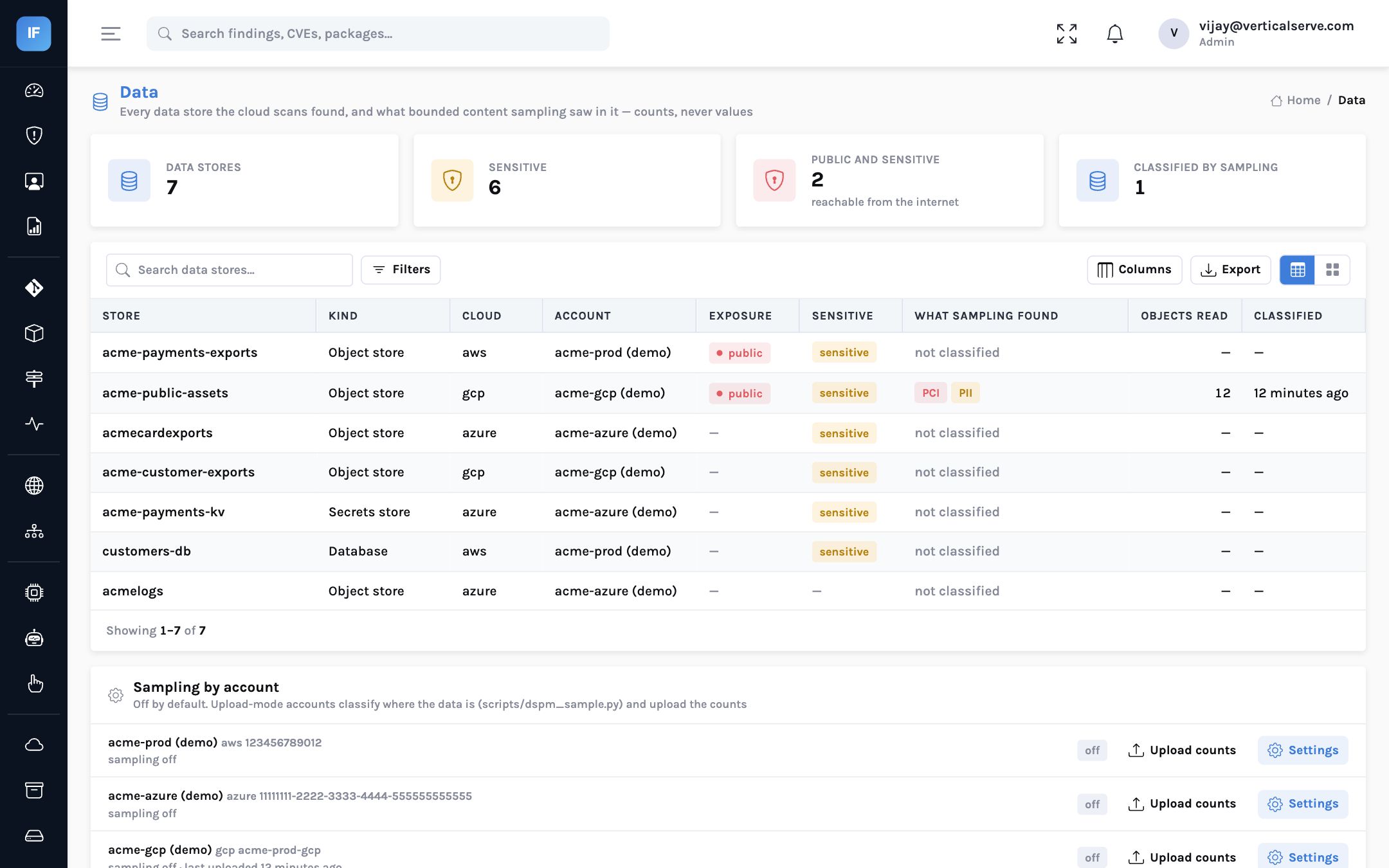
The cloud inventory already lists every data store — S3, RDS, DynamoDB, Redshift and Secrets Manager on AWS; Storage, SQL, Cosmos DB, Synapse and Key Vault on Azure; Cloud Storage, BigQuery, Cloud SQL, Spanner and Secret Manager on Google Cloud. Discovery tags them as data stores. What it cannot tell you is what is inside.
Sampling answers that, and it is designed around a data protection officer’s concerns:
- Opt-in per account. Off until a security lead turns it on.
- Bounded. At most N objects and M kilobytes of text per object, read through the account’s own identity.
- Validated detectors. Card numbers need a valid issuer prefix and Luhn checksum, IBANs the mod-97 check, Aadhaar numbers the Verhoeff check; emails and phone numbers need several hits; secrets cover cloud keys, private keys and common tokens.
- Counts only. The result is “3 card numbers, 40 email addresses”. No matched value is ever stored or displayed; uploaded results with unknown detectors or non-numeric counts are discarded.
- Air-gapped accounts can run the sampling script where the data is and upload only the counts.
Sampling never stores a matched value. The store is marked sensitive and the paths that reach it are re-evaluated.
Where identity and data meet: the attack path
accepts unauthenticated traffic"] B --> C["Runs as
api-runner service account"] C --> D["Can read
acme-customer-exports"] C --> E["Can read
acme-public-assets"] E --> F["Sampling found
card numbers and emails"] style B fill:#fee2e2,stroke:#ef4444 style F fill:#fee2e2,stroke:#ef4444
From our demo Google Cloud account: a public workload, its service account, and the stores it can read, one of them now known to hold card data.
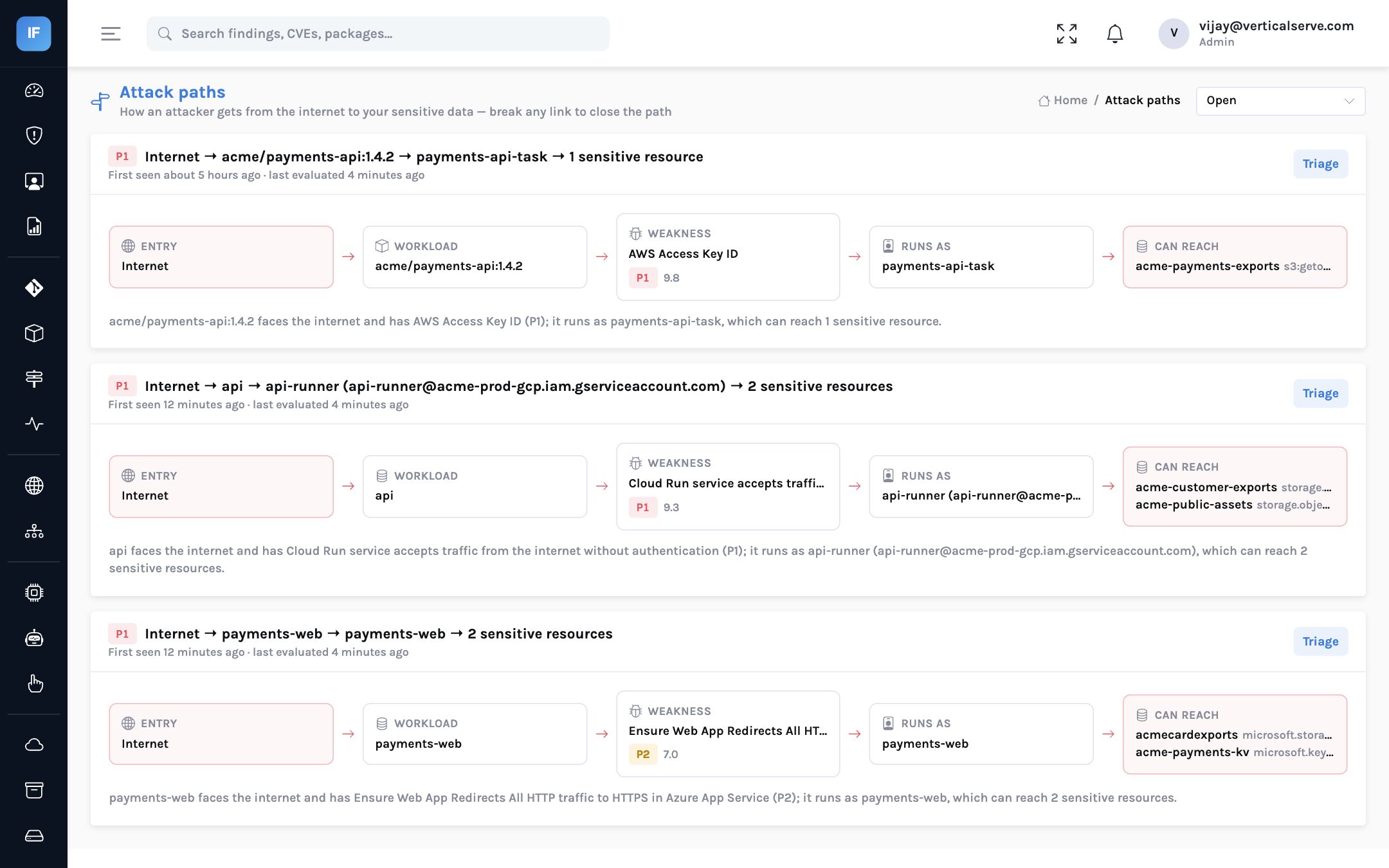
Sampling only ever marks a store sensitive, never unmarks it, so a person’s judgement is not overridden by a sample that happened to miss. Two findings come straight from the data: sensitive data in a public store (critical), and credentials stored in a data store (high).
AWS role, Azure service principal (Reader), GCP service account (Viewer, Security Reviewer); or upload exports.
Start with identities that are both internet-reachable and can escalate.
Manual marks first: they are authoritative and never undone by sampling.
Agree object and size limits first; counts only are stored.
Fix any one hop: the vulnerability, the exposure, the permission or the data location.
Limits, stated plainly
The Azure and Google Cloud collectors are built to the public API references and tested against mocked responses; they have not yet been run against a customer tenant. Azure deny assignments and GCP IAM conditions are not applied, so effective permissions can be over-reported; GCP folder and organization bindings are applied to every resource in the account. Sampling covers object stores only; databases are discovered, and their classification can be uploaded. Detectors are patterns with checksums, not a trained classifier.
Escalation routes, explained
The most dangerous identities are often not the administrators everyone already watches. They are the ones that can make themselves administrators. A few illustrative routes, one per cloud:
| Cloud | Route | Why it matters |
|---|---|---|
| AWS | iam:PassRole plus permission to start compute | Launch a workload that runs as a more powerful role and act through it |
| Azure | Permission to write role assignments at subscription scope | Grant itself Owner; Contributor alone does not include this |
| Google Cloud | iam.serviceAccounts.actAs with permission to deploy to Cloud Run | Run code as a service account with broader access than its own |
Each route is raised once per identity, listing every route it has, with the actions involved. The fix is usually narrow: remove one permission, or scope it to specific resources, rather than rebuilding the role.
Working with the data protection officer
Data sampling touches personal data, so it needs agreement before it is switched on. The conversation is easier when the design answers the usual questions up front:
- What is read? A bounded sample: a fixed number of objects per store and a fixed number of kilobytes of text per object. Binary files are skipped.
- What is kept? Counts per detector and the number of objects and bytes read. No matched value is stored, logged or shown.
- Who decides? Sampling is off by default and switched on per cloud account by a security lead.
- Can it run without giving InsightFortify access? Yes: the sampling script runs where the data is, and only the counts are uploaded.
| Metric | What good looks like |
|---|---|
| Identities that are both internet-reachable and can escalate | Falling to zero |
| Unused identities older than 90 days | Removed or disabled |
| Public data stores with sensitive data | Zero |
| Attack paths ending at sensitive data | Each one owned and closing within its SLA |
Why per-cloud boundaries matter
It is tempting to draw one big graph across every cloud and let paths go wherever the edges lead. That produces impressive diagrams and misleading conclusions. An Azure managed identity cannot read a Google Cloud bucket because both are marked sensitive; it would need credentials stored somewhere it can reach, and that is a different finding (credentials in a data store) with its own evidence.
InsightFortify therefore computes reach per cloud: Azure permissions are matched against Azure resource ids and their scope ancestry, Google Cloud permissions against the resource and its project. A path never crosses a cloud boundary on assumption. Where credentials genuinely bridge two clouds, the credential finding and the path in each cloud together tell the story, and each can be fixed independently.
The same caution shapes how effective permissions are reported. Because Azure deny assignments and Google Cloud IAM conditions are not yet applied, the analysis can report a permission that a deny or a condition removes. We would rather over-report and let a cloud engineer dismiss a finding with a reason than under-report an escalation route.
What it means for each reader
For the CISO
One answer across three clouds to “which public workloads can reach regulated data?”
Sampling that stores counts, not values, is a design your data protection officer can approve.
For the AppSec lead
Prioritise identities that are both reachable from the internet and able to escalate.
Use least-privilege suggestions as a starting point, then test them; they come from observed usage.
For the board
Attack paths end at the data that matters, so the risk number reflects business impact, not resource counts.
Multi-cloud no longer means three partial pictures.
An attack path ends at data. Know what the data is, and who can reach it, in every cloud you run.
Effective permissions and escalation routes on one side, evidence of what the stores hold on the other, joined after every scan.