Three questions come up in almost every serious incident review involving containers. Which commit is running in production? Is that workload reachable from the internet, and as which cloud identity? And why did the cluster let that image in at all? Most organizations can answer each one eventually, from three different teams and four different tools. This post walks through answering all three automatically.
In short
- Images trace back to commits on their own. Registry syncs read the standard OCI labels on each image and link it to its source repository and revision.
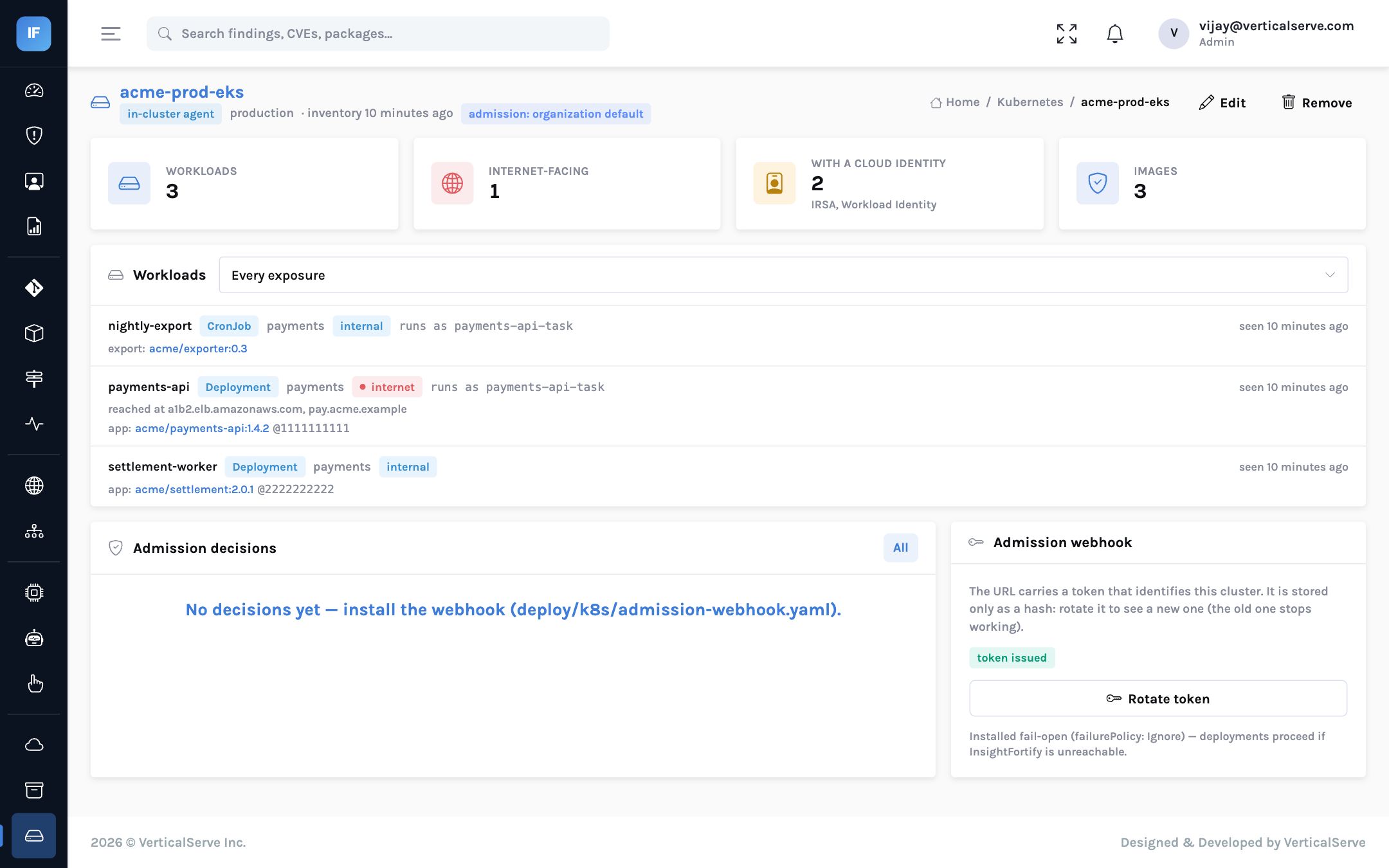
- The cluster says what is actually running and how exposed it is. A read-only inventory records workloads, the digests the kubelet resolved, public load balancers and ingresses, and the cloud identity each service account uses.
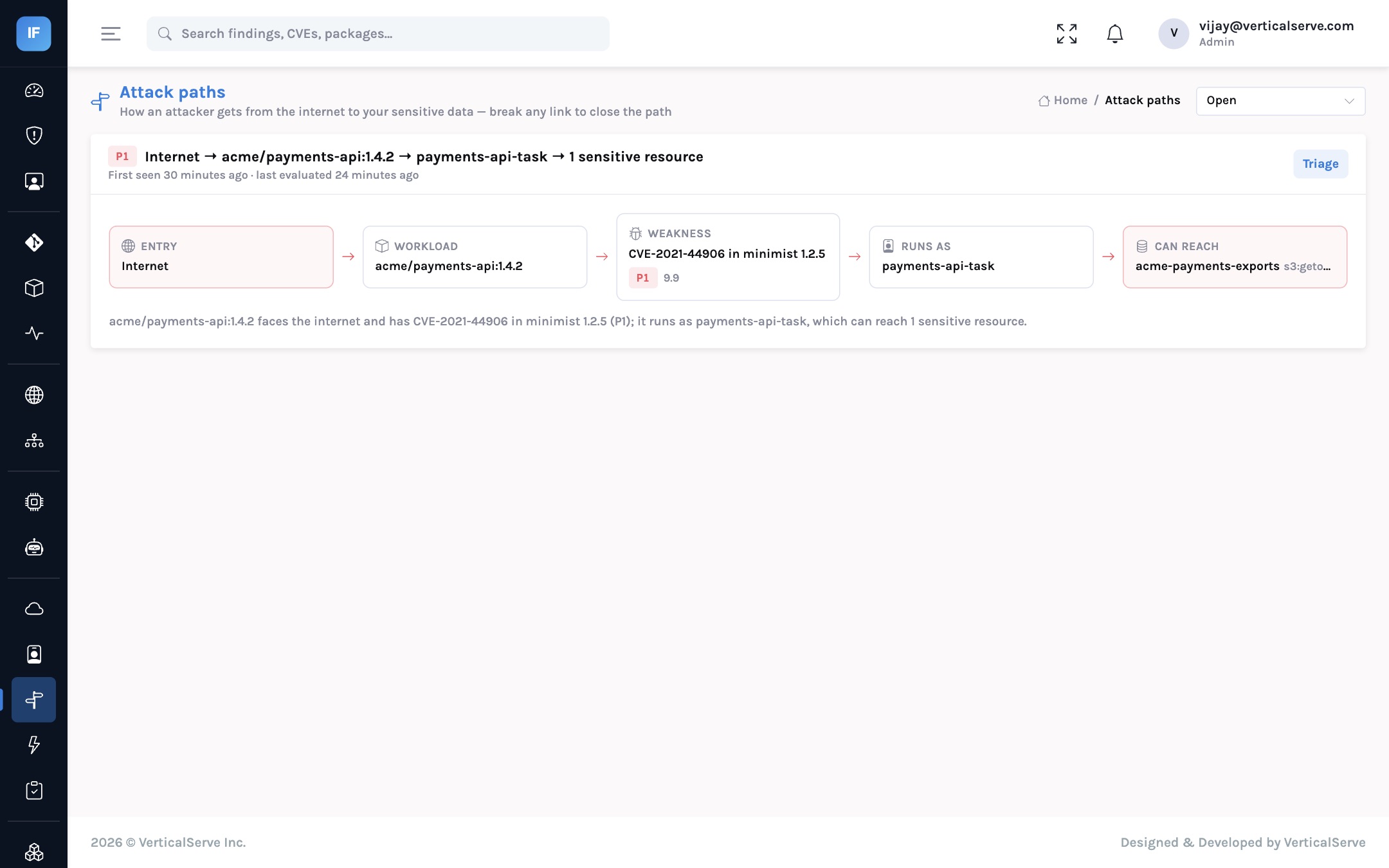
- Attack paths open and close without manual registration. An internet-facing workload, its vulnerable image and its cloud identity are joined automatically.
- Admission control starts in audit mode. The webhook records what it would refuse before it refuses anything, and is installed fail-open so InsightFortify can never stop a deployment by being down.
The situation
In this illustrative case, a platform team runs a production Kubernetes cluster behind a public load balancer. A critical vulnerability is reported in a library used by the payments service. The CISO asks whether production is affected. Answering takes most of a day: the registry has dozens of tags for the image, nobody is sure which one the cluster resolved, the service’s cloud role was set up by a team that has since reorganized, and nobody knows whether the image even came from the main branch.
Registry tags, kubectl output, IAM consoles and the Git history are joined by hand, by whoever is on call, under pressure.
Source repository and commit, registry and digest, every workload running it, its exposure and identity, and its open findings, on one page.
Step 1: images that know where they came from
Most container build systems can stamp images with the org.opencontainers.image.source and
org.opencontainers.image.revision labels, and many do by default. InsightFortify’s registry sync
reads them (and the older label-schema and GitLab equivalents) from each image’s configuration. It works
with Amazon ECR through a cloud account’s read-only role, and with any OCI v2 registry — GHCR, Docker
Hub, Harbor, Quay, Artifact Registry, ACR — with credentials held as a secret reference.
Only manifests and the configuration blob are read. New or changed digests are queued for a vulnerability and SBOM scan pinned to the digest, so the result describes exactly what was pushed, not whatever a tag points at today.
Step 2: what the cluster is actually running
A small in-cluster agent, a CronJob with a list-only role that cannot read secrets or config maps, posts the inventory to InsightFortify. Alternatively the worker reads the cluster API directly with credentials behind a secret reference. Either way, the inventory records:
- Workloads (Deployments, StatefulSets, DaemonSets, CronJobs, Jobs and bare Pods) and the image digests the kubelet resolved.
- Exposure: a LoadBalancer service or an ingress not annotated as internal makes a workload internet-facing.
- Identity: the service account and the cloud identity it maps to — IRSA on EKS, GKE Workload Identity, Azure workload identity.
acme/payments-api"] --> B["Image label
source + revision"] B --> C["Registry digest
sha256 pinned scan"] C --> D["Running in prod
payments namespace"] D --> E["Public load balancer
internet-facing"] D --> F["Service account
IRSA role"] F --> G["Sensitive bucket
payment exports"] style E fill:#fee2e2,stroke:#ef4444 style G fill:#fee2e2,stroke:#ef4444
The links each come from a different system; InsightFortify joins them so an attack path can be computed.
Running images take on the workload’s exposure, identity and environment. Their findings are rescored and attack paths re-evaluated, so a cluster sync can open a path — internet, vulnerable workload, over-privileged role, sensitive data — or close one, without anyone registering an image by hand.
Step 3: admission control, rolled out safely
Once you can see what should not be running, the natural next step is to stop it from starting. InsightFortify implements a Kubernetes validating admission webhook. For each create or update, it judges only the images the object would newly run — scaling or relabelling a deployment is never blocked — and applies the organization’s policy: refuse images with open findings at or above a priority, and decide what to do about images it has never seen. Images with a known-malicious package are always refused in enforce mode.
Every decision except dry runs is recorded, so the audit period produces evidence for the enforcement decision.
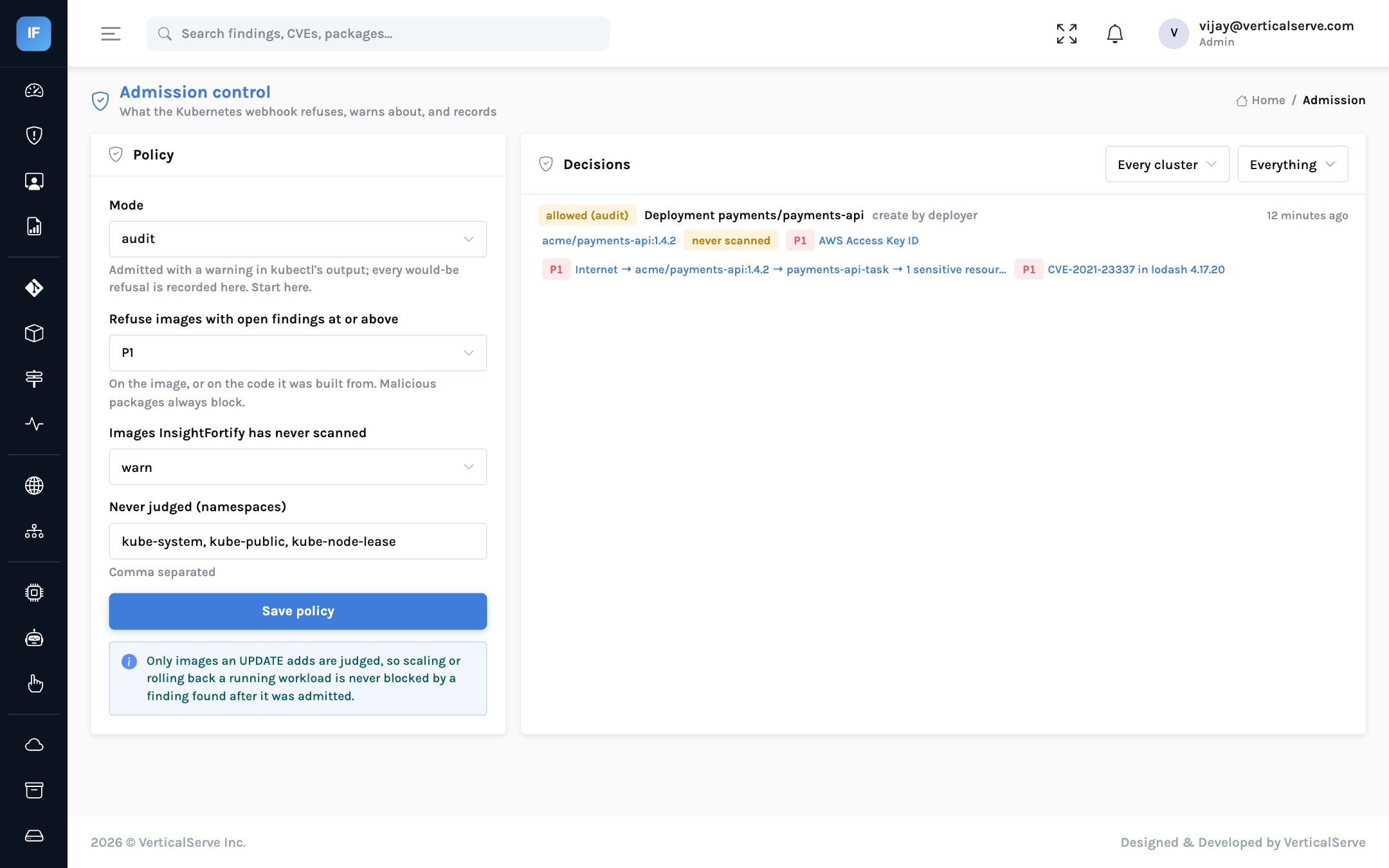
The webhook manifest is installed fail-open with a 5-second timeout; nothing is refused.
kube-system, kube-public and kube-node-lease are exempt by default; add any other platform namespaces.
Each one is a deployment that policy would have stopped. Fix or accept them first.
Allow, warn or deny images InsightFortify has never scanned; warn is the usual start.
A cluster can override the organization default, so start with one cluster.
Fail-open, deliberately
An admission webhook that fails closed turns a security tool outage into a production outage. The manifest uses failurePolicy: Ignore: if InsightFortify cannot answer in time, deployments proceed and the gap is visible in the decision log. Enforcement is a policy layered on top of visibility, never a replacement for it.
Limits worth knowing
- Registry and cluster reads are built to the documented APIs (ECR, the OCI distribution token handshake, the Kubernetes list API) and tested against mocks and recorded shapes; they have not yet been run against a customer’s live registry or cluster.
- Admission blocks on what InsightFortify already knows. It does not verify image signatures or provenance (cosign, SLSA), and it does not mutate objects to pin digests.
- An image keeps its last exposure until it is seen again; one that stops running is not instantly downgraded.
- OCI tag lists carry no push dates, so “newest tags” is ordered by version.
The policy choices, and sensible defaults
| Setting | Options | Suggested start | Why |
|---|---|---|---|
| Mode | off, audit, enforce (per organization, overridable per cluster) | Audit everywhere | Evidence before enforcement |
| Priority threshold | P1 to P4 | P1 | Block only what the organization already treats as urgent |
| Unknown images | allow, warn, deny | Warn | Images InsightFortify has never scanned are a coverage gap, not necessarily a risk |
| Exempt namespaces | Any list | The control-plane defaults | Never judge the cluster’s own components |
Two behaviours are fixed rather than configurable, on purpose. An update that only scales or relabels a workload, without introducing a new image, is never blocked, so admission control cannot stop an emergency scale-out. And dry runs are judged but not recorded, so tooling that validates manifests does not flood the decision log.
Questions to settle with the platform team
- Who approves the move from audit to enforce, and what evidence do they need? Usually two weeks of decisions with no unexplained would-refuse entries.
- How is a blocked emergency fix handled? The fastest path is to fix or accept the finding in InsightFortify; a per-cluster override to audit mode is the documented fallback.
- Which build pipelines set OCI labels? Images without source labels still get scanned and judged, but cannot be traced back to a commit.
- Push or pull inventory? The in-cluster agent avoids giving InsightFortify cluster credentials; pull mode avoids running anything in the cluster.
| Metric | What good looks like |
|---|---|
| Running images traced to a commit | Rising towards all production images |
| Internet-facing workloads with an open P1 | Falling; each one is a likely attack-path entry |
| Would-refuse decisions per week (audit) | Falling before enforce mode is switched on |
| Refused deployments later approved by exception | Rare, and each one recorded |
The incident question, answered
Return to the opening scenario. A critical vulnerability is announced in a library used by the payments service, and the CISO asks whether production is affected. With registries and the cluster connected, the answer is a sequence of lookups rather than a day of investigation. The vulnerability page lists every image whose SBOM contains the affected version. Each image page shows the commit it was built from, the registry digest, and every workload running it, with its namespace, its exposure and the cloud identity it uses. If one of those workloads is internet-facing and its identity can reach sensitive data, an attack path already exists as a P1 finding with an owner and a due date.
The second half of the answer is about the future. With admission control in audit mode, the decision log shows whether the vulnerable image was deployed again since the announcement, and by whom. In enforce mode, it could not have been, unless someone accepted the finding, which is itself recorded. That is the difference between “we think we are not exposed” and “here is the evidence”, and it is the difference an audit committee notices.
None of this replaces the platform team’s judgement. It removes the hours spent joining four systems by hand, so that judgement is applied to the decision rather than to the investigation.
What it means for each reader
For the CISO
“Are we running it in production?” becomes a lookup, with the commit, the exposure and the identity attached.
Admission control is introduced as evidence first and enforcement second, which is how to get platform teams to agree to it.
For the AppSec lead
Ask build teams to set the OCI source and revision labels; it is a one-line change and unlocks the whole chain.
Read the would-refuse log before turning on enforce mode.
For the board
Fewer known-vulnerable images reach production, without making the security tool a single point of failure.
Incident questions get answered in minutes, not days.
You cannot block what you cannot trace. Trace first, audit second, enforce last.
Images that name their commit, an inventory that names their exposure and identity, and an admission policy that starts by watching.