A vulnerability is a mistake someone made. A malicious package is an attack someone planned. The first waits to be exploited; the second runs its payload the moment it is installed, often on a developer laptop or a build server holding exactly the credentials an attacker wants. Treating them as two rows in the same severity-sorted list misses the difference that matters.
In short
- Known-malicious versions are always P1. InsightFortify checks every component against OSV’s malicious-package reports (the
MAL-ids from the OpenSSF project) and raises a finding of its own kind. - It looks back as well as forward: when a version you already run is reported malicious later, the daily sync raises the finding on every repository and image whose latest SBOM contains it.
- Weaker signals are flagged, not blocked by default: typosquats, npm install scripts, packages younger than 30 days, and a publisher change on a release from the last 180 days.
- A package firewall stops it before install: one API call from CI or a registry proxy returns allow, warn or block under your organization’s policy.
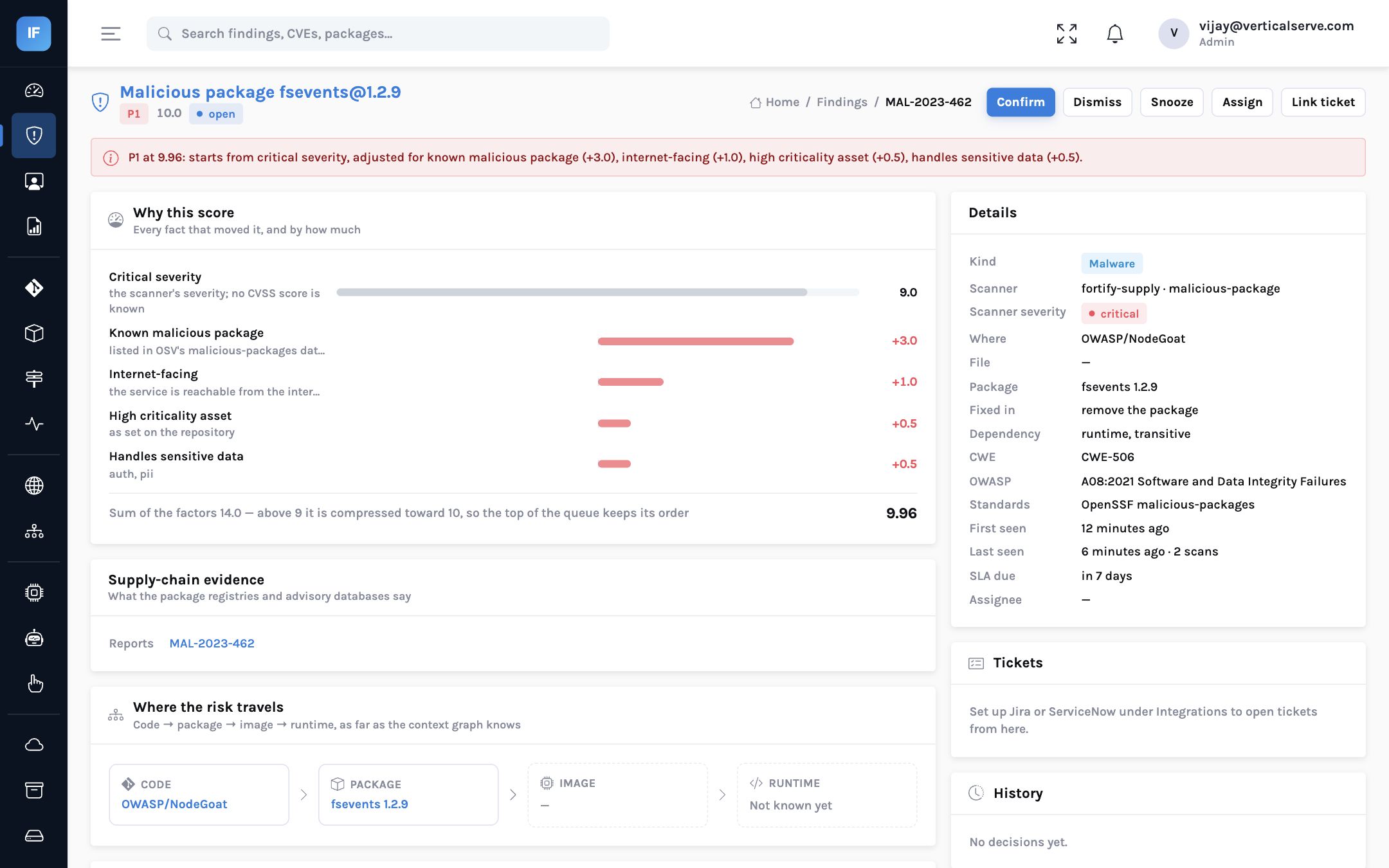
- A real example from our own scans: OWASP NodeGoat pins fsevents 1.2.9, which OSV lists as malicious (MAL-2023-462).
A real example, not a hypothetical
When we rescanned OWASP NodeGoat, the teaching application, InsightFortify raised one finding of kind
malware: fsevents@1.2.9. That is not a false alarm. OSV lists fsevents versions 1.0.0
through 1.2.10 under MAL-2023-462. According to the advisory, those versions downloaded
prebuilt binaries from a cloud storage location that later lapsed, so the binaries a build fetched could
contain code nobody at the project wrote. A companion advisory (GHSA-8r6j-v8pm-fqw3) describes the same
issue as code injection. The fix is to move to 1.2.11 or later.
Two points matter for a security leader. First, the package is not obscure: it is a common, transitive dependency of JavaScript tooling on macOS. Second, the advisory was published years after the affected versions, so a scan that only checks new installs would never have flagged a lockfile written before then.
data
Open-source registries remove thousands of malicious packages every year, and security researchers have reported sustained growth in malicious uploads to npm and PyPI. The OpenSSF malicious-packages project collects these reports in OSV format so that tools can check against them.
Sources: OpenSSF Package Analysis and malicious-packages repository; OSV.dev; annual software supply chain reports from security vendors (figures vary by method).
Why vulnerability scanners miss it
Dependency scanners are built around CVEs: a known flaw in a legitimate package, with a severity and a fixed version. Malicious packages rarely have a CVE. Many are removed from the registry within days, so a scanner that resolves versions live may not even see them. And the signals that precede a confirmed report — a name one character away from a popular package, a brand-new publisher, an install script — are not vulnerabilities at all.
Malicious versions without a CVE are invisible. Typosquats look like any other dependency. A version reported malicious next year is never re-checked.
OSV malicious reports become P1 findings, checked again daily against what you already run. Suspicious signals are flagged for review, and the firewall decides at install time.
The signals, and how much weight each gets
| Signal | How it is detected | Default handling |
|---|---|---|
| Known malicious | Version listed in OSV with a MAL- id; cached and re-checked daily | Finding of kind malware, +3.0, always P1; firewall blocks |
| Typosquat | One edit, a dropped separator or a look-alike character away from one of the 3,000 most downloaded packages in npm or PyPI, and not itself a widely used package | Supply-chain finding; firewall warns |
| Install script | npm lockfile says the package runs a script on install; popular packages and known native builds excepted | Off by default in the firewall; finding when seen |
| Young package | First published fewer than 30 days before it was checked | Supply-chain finding; firewall warns (threshold adjustable, 0 turns it off) |
| Publisher change | npm: a release from the last 180 days published by an account that never published the package before | Supply-chain finding; firewall warns |
Why the 180-day rule exists
Our first version flagged any publisher change, and it flagged a dozen long-lived NodeGoat dependencies whose maintainers handed over years ago. That is ordinary open-source life, not an attack. A takeover matters while the release is recent, so the signal now looks only at releases from the last 180 days. We caught this by running the product on real code before shipping.
The package firewall
Finding a malicious package after it is installed is useful; stopping the install is better. The firewall is a single API call that CI or a registry proxy makes with a list of package versions. It answers allow, warn or block for each, with the reasons, under the organization’s policy. It asks OSV live for versions it has not checked in the last day and falls back to its cache if OSV is unreachable, saying which it did.
The firewall answers per package, with reasons, so the developer sees exactly what to change.
The default policy blocks known-malicious versions and versions with a critical, actively exploited vulnerability, and warns on suspected typosquats, recent publisher changes and packages first published in the last 30 days. Install-script warnings are available but off by default, because install scripts are common in legitimate packages. Every setting is per organization.
in the wild?"} C -- "yes" --> X C -- "no" --> D{"Typosquat, recent publisher
change, optional signals?"} D -- "yes" --> W["Warn"] D -- "no" --> OK["Allow"] style X fill:#fee2e2,stroke:#ef4444 style W fill:#fef3c7,stroke:#f59e0b style OK fill:#ccfbf1,stroke:#0d9488
The default decision order. Each step is a policy switch the organization controls.
Responding when one is found
The finding lists every repository and image whose latest SBOM contains it.
A malicious package runs at install time: the risk is to wherever it was installed, not only production.
Registry tokens, cloud keys and CI secrets first.
For fsevents, 1.2.11 or later.
So the same version cannot come back through another repository.
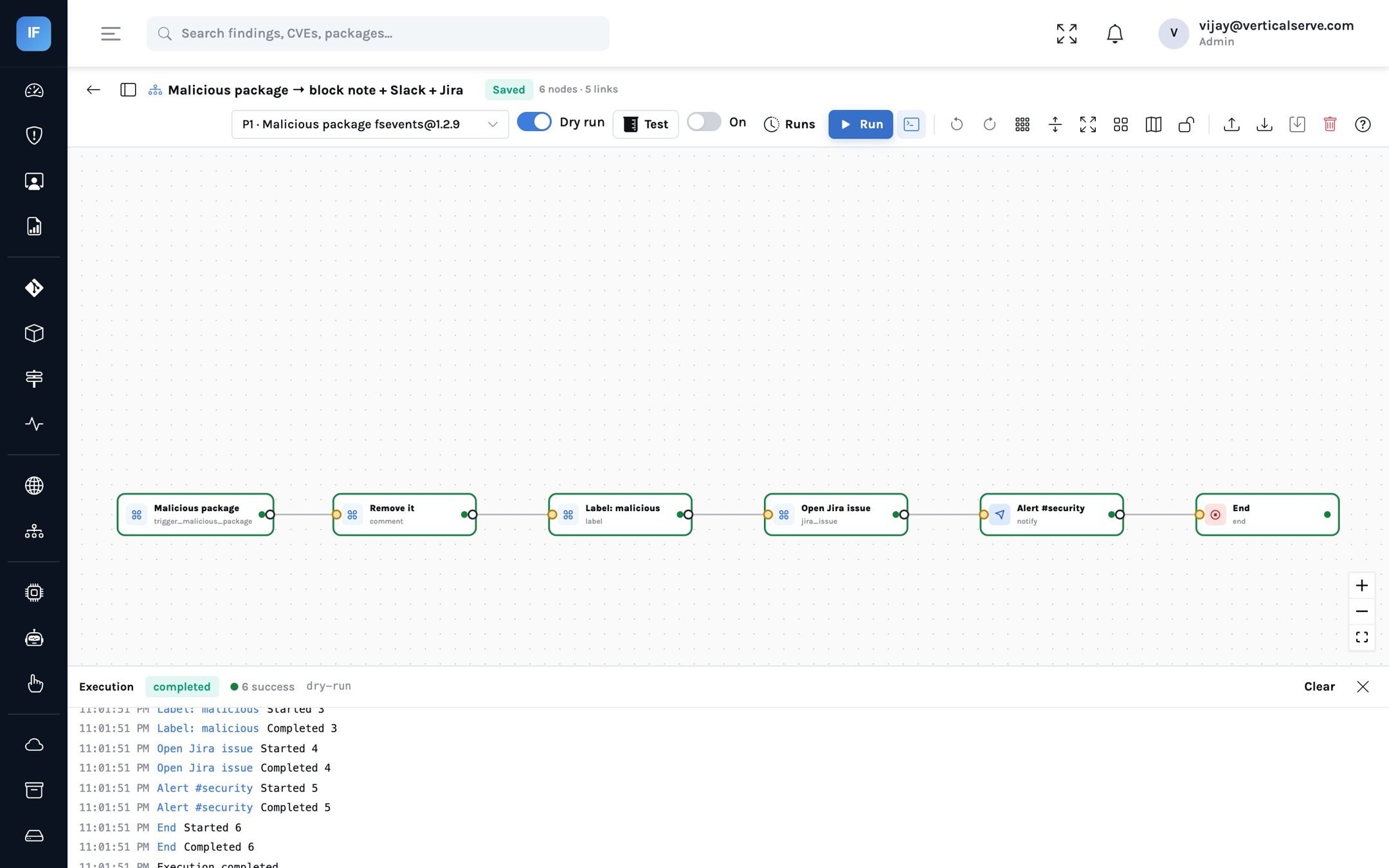
The first moves of that runbook do not need a person. The malicious package playbook template
starts on exactly this event, adds a note saying the version must be removed, labels the finding
malicious, opens a Jira issue and alerts the security channel. Like every template it installs
switched off. Below is a dry run of it against the real fsevents finding from NodeGoat: all six steps ran,
conditions were evaluated for real, and nothing was sent.
Typosquats, in practice
A typosquat is a package named to be installed by mistake. The patterns are well known, which is why they can be checked mechanically against a list of popular package names:
| Pattern | Illustrative example | What InsightFortify checks |
|---|---|---|
| One character changed or swapped | lodahs for lodash | Edit distance of one from a popular name |
| Separator dropped or added | reactdom for react-dom | Names equal once separators are removed |
| Look-alike characters | requ1re for require-style names | Homoglyph substitutions such as 1/l and 0/o |
A widely used package is never a suspect, however close its name is to another: about 17,000 npm names
(the npm-high-impact list) and the top 15,000 PyPI projects by downloads are treated as legitimate, and a
name is compared only against the 3,000 most downloaded in its ecosystem. Our first version used a list of a
few hundred names, and it warned on safer-buffer and through2; the larger lists
fixed that, while real past typosquats such as crossenv (npm, 2017) and colourama
(PyPI, 2018) are still caught. Scoped npm names and Maven coordinates are not covered yet. Because similar
names can be legitimate, the default is to warn, not block.
Writing the package policy
The firewall policy is short, but each switch is a business decision. Questions to settle with engineering leadership before turning on blocking:
- Who can override a block, and how is it recorded? A malicious-package block should need a security lead; a typosquat warning can be acknowledged by the developer.
- Where is the check enforced? In CI only, in a registry proxy for every install, or both. A proxy also protects developer laptops.
- What about new packages? Warning on packages younger than 30 days slows adoption of brand-new libraries slightly; most teams accept that trade.
- How are build hosts treated after a hit? Agree in advance that a confirmed malicious install is an incident, so nobody debates it at 2am.
| Metric | What good looks like |
|---|---|
| Known-malicious versions present in any SBOM | Zero, and each one closed within a day of discovery |
| Repositories behind the firewall check | All production repositories, then developer tooling |
| Firewall warnings acknowledged versus ignored | Warnings are read; the rate of ignored warnings falls |
| Median age of the oldest unpinned dependency | Falling, as fewer surprises come from unreviewed upgrades |
Why retroactive checking matters most
The fsevents case illustrates the least understood part of supply-chain risk: time. The affected versions were published long before the malicious-package report was. A lockfile written in between looks perfectly normal to any check that runs only when a dependency is added. The risk was introduced at install time; the knowledge arrived years later.
That is why InsightFortify keeps the malicious-package data in a shared cache, re-checks it daily, and compares it with the latest SBOM of every repository and image, not only with new scans. When a version you already run is reported, the finding appears on every repository and image that contains it, at P1, without anyone rescanning. For a security leader, that turns “were we affected by the incident in this morning’s news?” into a filter on the findings queue.
The same logic applies in the other direction. When a report is withdrawn or corrected upstream, the cached data changes on the next sync and the finding follows. The decision always rests on the current public record, not on whatever was true the day the dependency was added.
What it means for each reader
For the CISO
A malicious package is an incident, not a backlog item. The P1 rule and the retroactive check make sure it is treated as one.
The firewall is a control you can describe to auditors: what it blocks, what it warns on, and who sets the policy.
For the AppSec lead
Start the firewall in warn-only mode for a sprint, read the warnings, then turn on blocking for malicious versions.
If you turn on install-script warnings, expect some noise; that is why they are off by default.
For the board
Software supply chain attacks are a board-level topic. This is the answer to “would we know, and could we stop it?”
It uses public, independent data (OSV and OpenSSF), not a vendor’s private list.
Vulnerabilities wait to be exploited. Malicious packages run when they are installed.
Check what you already run against the malicious-package reports every day, and put a policy in front of the install.